Windows Server 2025 vs 2022: What’s New and Should You Upgrade?

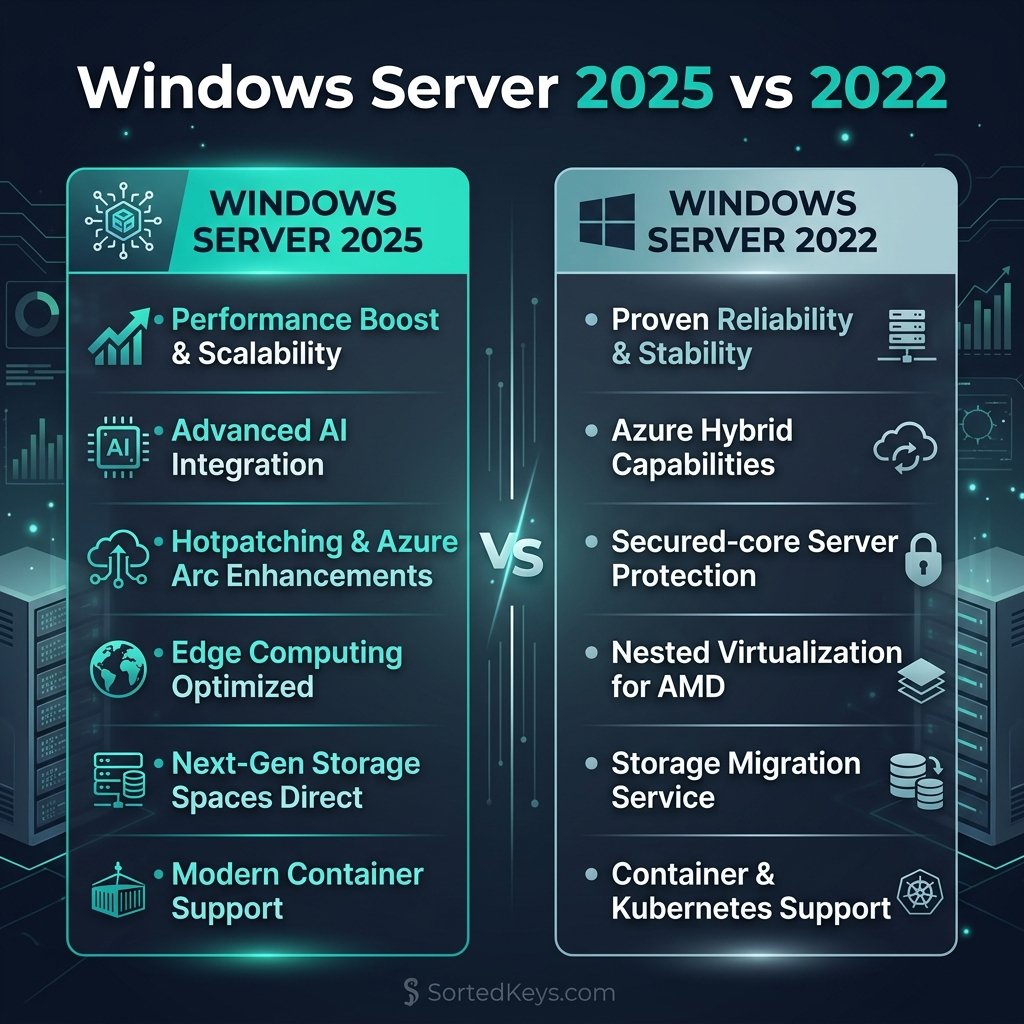
The short answer: If your infrastructure relies heavily on hybrid cloud environments, demands maximum NVMe storage performance, or you want to eliminate server reboots with the new Hotpatching feature, you should absolutely upgrade to Windows Server 2025. However, if you are running a stable, on-premise environment that doesn’t require next-generation Active Directory security features, Windows Server 2022 remains an incredibly robust and fully-supported option until 2031.
1. What is New in Windows Server 2025?
Windows Server 2025 represents a massive leap forward, particularly for enterprises integrating on-premise servers with Microsoft Azure. Here are the standout features that separate it from Server 2022:
- Hotpatching for Everyone: Previously restricted to Azure editions, Hotpatching is now available in standard Windows Server 2025. This allows IT admins to apply critical security updates in memory without restarting the server, virtually eliminating planned downtime.
- Next-Generation Active Directory: Server 2025 introduces the first major update to Active Directory in nearly a decade. It features a new functional level, improved database performance (utilizing 32k pages), and significantly stronger default security protocols against modern credential theft.
- NVMe Storage Revolution: Storage performance has been completely rewritten. Server 2025 can deliver up to 90% more IOPS on NVMe SSDs compared to Server 2022, making it the ultimate choice for database servers and hyper-converged infrastructure.
Ready to Upgrade Your Infrastructure?
Deploy the most secure and high-performing server OS Microsoft has ever built. Get your genuine volume license keys with instant digital delivery.
Buy Windows Server 2025 Standard Buy Windows Server 2025 Datacenter2. Windows Server 2022: Still a Powerhouse
Despite the new features in 2025, Windows Server 2022 is by no means obsolete. For many small-to-medium businesses (SMBs), it remains the perfect balance of price, stability, and security.
Server 2022 introduced Secured-core server protection, TLS 1.3 enablement by default, and robust Hyper-V virtualization. If you are currently running Server 2022 and do not desperately need Hotpatching or the new NVMe storage speeds, you can safely skip the 2025 upgrade cycle. Server 2022 will receive extended support from Microsoft until October 2031.
3. Feature Comparison: 2025 vs 2022
| Feature | Windows Server 2022 | Windows Server 2025 |
|---|---|---|
| Hotpatching (Rebootless Updates) | Azure Edition Only | Available on all editions |
| Active Directory | Standard (8k database pages) | Next-Gen (32k database pages) |
| Storage Performance (NVMe) | Standard IOPS | Up to 90% higher IOPS |
| SMB over QUIC | Azure Edition Only | Standard/Datacenter supported |
4. The Verdict: Should You Upgrade?
If you are currently running legacy servers (like Windows Server 2012 or 2016), you should upgrade directly to Windows Server 2025 to future-proof your infrastructure for the next decade.
If you recently deployed Windows Server 2022, an immediate upgrade is likely unnecessary unless your organization specifically requires rebootless Hotpatching to maintain 99.999% uptime, or you need the massive storage I/O performance boost for high-frequency databases.
Frequently Asked Questions (FAQ)
Can I upgrade directly from Server 2019 to Server 2025?
Yes. Microsoft supports in-place upgrades skipping one version, meaning you can upgrade directly from Windows Server 2019 to Windows Server 2025 without wiping your data.
Does Hotpatching in Server 2025 require Azure Arc?
Yes. To utilize the rebootless Hotpatching feature on standard on-premise deployments of Windows Server 2025, you will need to connect the server via Azure Arc and may incur a small subscription fee for that specific feature.
What is the End of Life (EOL) date for Windows Server 2022?
Windows Server 2022 will reach the end of mainstream support in October 2026, but it will continue to receive critical security updates under extended support until October 14, 2031.