Windows 11 Pro for Workstations vs Windows 11 Pro: Do You Need the Upgrade?

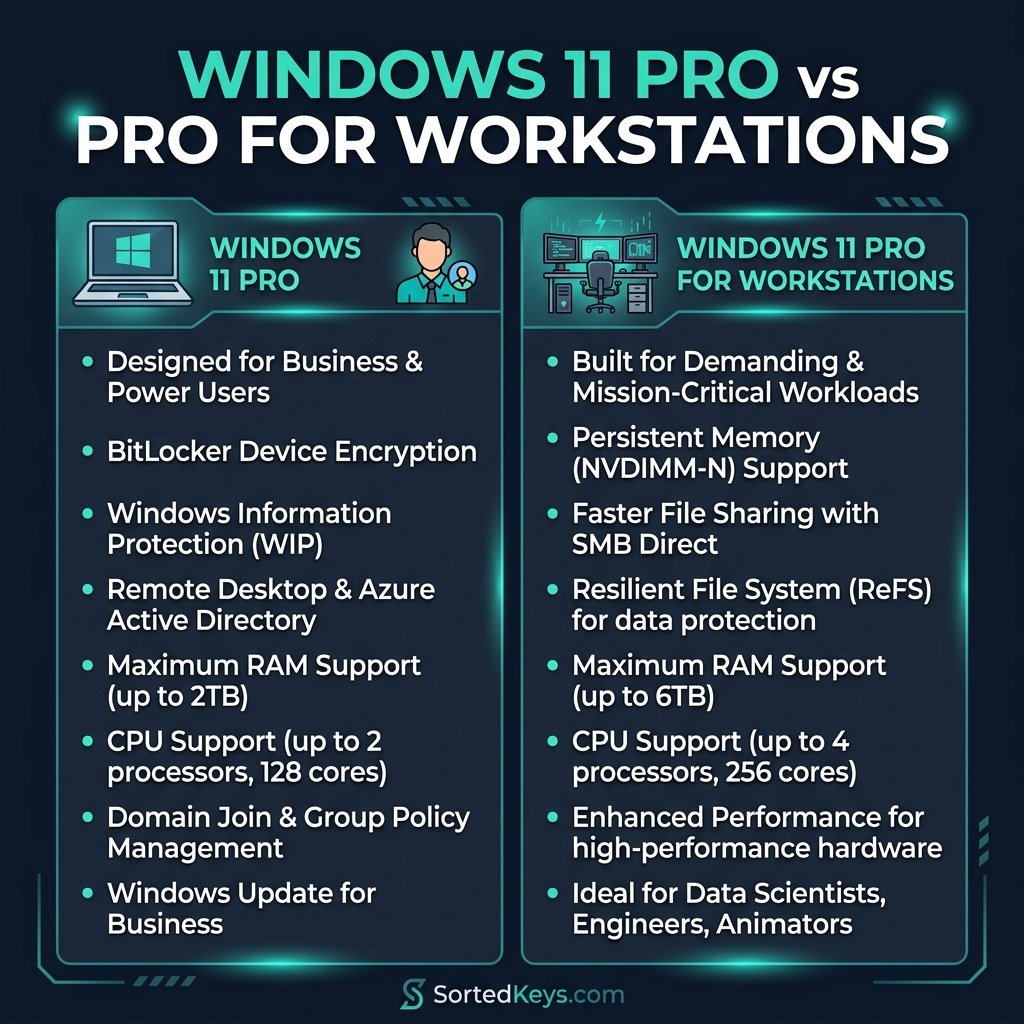
The short answer: Unless you are running a server-grade motherboard with Intel Xeon or AMD EPYC processors, you do not need Windows 11 Pro for Workstations. For 99.9% of businesses, gamers, and power users, standard Windows 11 Pro is more than powerful enough. The “Workstations” edition is specifically designed for data scientists, CAD professionals, and animators running massive, multi-CPU systems with terabytes of RAM.
Let’s break down exactly what you get when you upgrade to Windows 11 Pro for Workstations, and why the standard Pro edition is likely the better (and cheaper) choice.
1. Hardware Limits: CPUs and RAM
The primary reason Windows 11 Pro for Workstations exists is to support server-grade hardware in a desktop environment.
- Windows 11 Pro: Supports up to 2 CPUs (physical processors on the motherboard) and up to 2 TB of RAM.
- Pro for Workstations: Supports up to 4 CPUs and a staggering 6 TB of RAM.
If you are building a high-end gaming PC with an Intel Core i9 or an AMD Ryzen 9, you only have 1 physical CPU. Even if you have 64GB or 128GB of RAM, you are nowhere close to the 2TB limit of standard Windows 11 Pro. Therefore, paying for the Workstations upgrade provides absolutely zero hardware benefit for standard desktop PCs.
Don’t Overpay for Features You Won’t Use
If you’re building a new PC or upgrading an office computer, standard Windows 11 Pro has all the security, virtualization, and remote desktop features you need. Get a genuine, lifetime license today for a fraction of the cost.
Buy Windows 11 Pro License2. ReFS (Resilient File System)
One of the most touted features of Pro for Workstations is native support for ReFS (Resilient File System). ReFS is Microsoft’s server-grade file system, designed to handle massive volumes of data and automatically detect and fix data corruption.
While ReFS is incredible for massive data arrays, it is generally overkill for a desktop PC. Furthermore, standard Windows 11 Pro uses NTFS (New Technology File System), which is highly stable, universally compatible, and perfectly suited for 99% of workloads. Unless you are managing massive storage pools of critical, unbacked-up data directly on your desktop, NTFS is exactly what you need.
3. SMB Direct & Persistent Memory
If you work in an enterprise environment where your PC needs to pull massive amounts of data from a server (like 8K raw video files or massive AI datasets), Pro for Workstations includes two highly specialized features:
- SMB Direct: This feature allows your PC to use a specialized network adapter (RDMA) to transfer data across a network at incredible speeds, with almost zero CPU usage.
- NVDIMM Support (Persistent Memory): This allows the OS to support specialized RAM modules that retain their data even when the power is turned off, providing insanely fast read/write speeds for critical data.
Again, to use either of these features, you need highly specialized, expensive enterprise hardware. If you don’t have an RDMA-capable network card or NVDIMM memory modules installed in your motherboard, these software features will sit entirely unused.
4. Feature Comparison Summary
| Feature | Windows 11 Pro | Pro for Workstations |
|---|---|---|
| Max CPUs Supported | 2 | 4 |
| Max RAM Supported | 2 TB | 6 TB |
| ReFS (Resilient File System) | No | Yes |
| SMB Direct | No | Yes |
| BitLocker & Hyper-V | Yes | Yes |
The Verdict: Which one should you buy?
For almost everyone reading this, including IT professionals, software developers, and gamers, Windows 11 Pro is exactly what you need. It includes all the essential business features like BitLocker encryption, Hyper-V virtualization, and Remote Desktop, while supporting enough RAM and CPU power to handle any consumer-grade hardware on the market.
You only need Windows 11 Pro for Workstations if you are building a literal workstation PC—meaning a system with Intel Xeon or AMD EPYC processors, ECC RAM, and enterprise-grade networking cards, and you intend to use it for massive, continuous data processing.
Frequently Asked Questions (FAQ)
Does Windows 11 Pro for Workstations improve gaming performance?
No. Pro for Workstations does not offer any gaming performance benefits over standard Windows 11 Pro or even Windows 11 Home. Games do not utilize ReFS or SMB Direct, and no consumer game requires more than 32-64GB of RAM.
Can I upgrade from Windows 11 Pro to Pro for Workstations?
Yes. If you realize you need the advanced features later, you can upgrade your existing Windows 11 Pro installation to Pro for Workstations simply by purchasing a new license key and entering it in the activation settings. You do not need to reinstall the OS.
What happens if I put more than 2TB of RAM in Windows 11 Pro?
The operating system will simply ignore any RAM beyond the 2TB limit. To utilize more than 2TB, you would need to upgrade to Pro for Workstations or Windows Server.